Simple Dream Diary1.2.5
Publisher Description
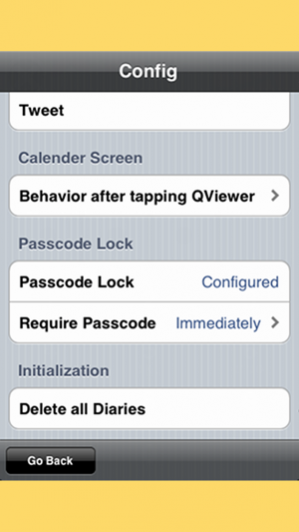
* * Make you FUN every day. App for writing Dream Diary more simply is appeared * *
[ Abstract ]
You can record the dream immediately after awakening in the morning.
There is no troublesome operation.
[ Features ]
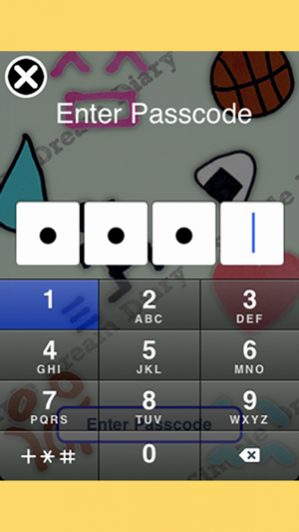
- Passcode Lock.
- The dream icons of all 50 types.
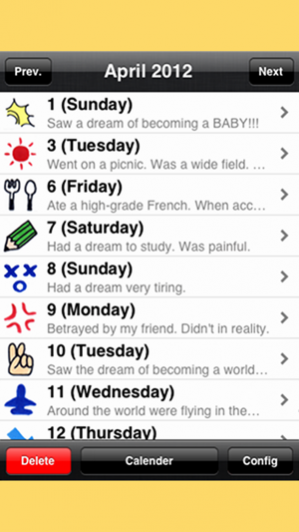
- "Calendar Screen" and "List Screen" are easy to check the Dream Diary.
▼▼▼▼▼▼▼▼▼▼▼▼▼▼▼▼▼▼▼▼▼▼▼
*****UpdateInfo. ver.1.2.0*****
*New Function at ver.1.2.0*
- iCloud backup
You can backup your dream diaries at config.
*New Function at ver.1.1.0*
You can specify the date at Calender View and List View.
->How to?
Please drag ( Any direction is OK ) the date from bar of the center of top.
Then The Date Picker will open.
Tap OK after select a date.
***********************
▲▲▲▲▲▲▲▲▲▲▲▲▲▲▲▲▲▲▲▲▲▲▲
[ Function ]
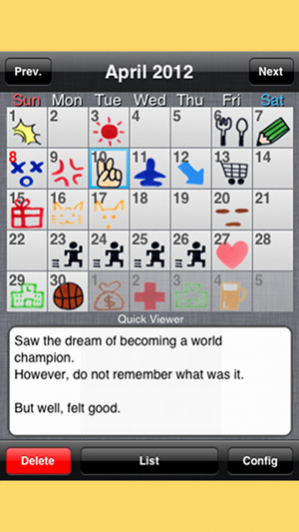
*Calendar Screen
- Viewer
Check a Dream Icon with the contents of the Dream Diary.
- Deletion
Delete selected freely, delete all.
- Changing Date
The previous month, next month, today(tap the date bar at the top)
※ You can check the contents of the diary at the bottom of the screen in "Quick Viewer".
*List Screen
- Viewer
Check a Dream Icon with the contents of the Dream Diary.
- Deletion
Delete selected freely, delete all.
- Changing Date
The previous month, next month, this month(tap the date bar at the top)
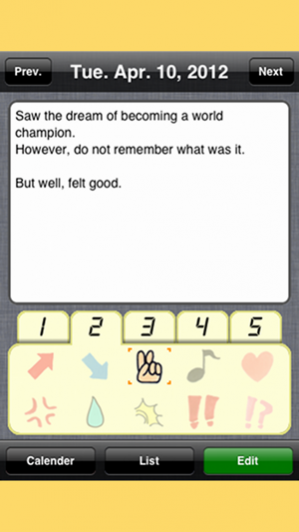
*Edit Screen
- Writing
Write a Dream Diary and set a Dream Icon.
- Viewer
Check a Dream Icon with the contents of the Dream Diary by day.
- Deletion
Delete a Dream Diary by day.
- Changing Date
The previous day, next day, today(tap the date bar at the top)
*Passcode Lock
Passcode authentication at startup.
※ You can set the time to take the lock from the ending of the app.
[ Tips ]
*What is the "Dream Icon"?
The Icon, such as face to symbolize the dream you had today.
Look for the icon of the perfect dream from among 50 types of all.
*How to use the "Quick Viewer"?
- Single Tap the center
Go to the edit screen Dream Diary.
- Double tap on the center.
Go to the edit screen Dream Diary and further to display the keyboard.
- Swipe the left and right.
Scroll the Dream Diary when it has long sentences.
※ You can configure the behavior of the center tap with single and double.
*How to delete all of Dream Diaries.
- Delete all in database.
If you select "Delete All of Dream Diaries" in the Settings screen, delete all of the dream diary was recorded up to that point.
- Delete all of Dream Diaries by month.
Delete all of Dream Diaries by month when pressing the Delete button with the state "has not been selected one of" in Calendar Screen and List Screen.
Oct 3, 2017 Version 1.2.5
- Bugs fixes
About Simple Dream Diary
The company that develops Simple Dream Diary is Casual App Team. The latest version released by its developer is 1.2.5.
To install Simple Dream Diary on your iOS device, just click the green Continue To App button above to start the installation process. The app is listed on our website since 2017-10-03 and was downloaded 9 times. We have already checked if the download link is safe, however for your own protection we recommend that you scan the downloaded app with your antivirus. Your antivirus may detect the Simple Dream Diary as malware if the download link is broken.
How to install Simple Dream Diary on your iOS device:
- Click on the Continue To App button on our website. This will redirect you to the App Store.
- Once the Simple Dream Diary is shown in the iTunes listing of your iOS device, you can start its download and installation. Tap on the GET button to the right of the app to start downloading it.
- If you are not logged-in the iOS appstore app, you'll be prompted for your your Apple ID and/or password.
- After Simple Dream Diary is downloaded, you'll see an INSTALL button to the right. Tap on it to start the actual installation of the iOS app.
- Once installation is finished you can tap on the OPEN button to start it. Its icon will also be added to your device home screen.
Program Details
System requirements
Download information
Pricing
Version History
version 1.2.5
posted on 2017-10-03
Oct 3, 2017 Version 1.2.5
- Bugs fixes
